
Paid SEO tools keep getting more expensive. AI search keeps adding new things to track. And most teams are already stretched thin. But here is the thing: the gap between a free stack and a paid one is smaller than most people think. The right free tools give you accurate data, fast feedback, and clear direction without adding a single dollar to your monthly spend. These 15 free SEO tools in 2026 do exactly that.
1. Google Search Console

Free performance data from Google
Strength: Google Search Console shows you clicks, impressions, average position, Core Web Vitals, and index coverage pulled directly from Google. In 2026 it also surfaces AI Overview impressions, which makes it more valuable than ever for tracking how your content performs in AI-generated results.
Pricing: Completely free, no paid tier exists. Requires only a verified property.
Pros & Cons: The data comes straight from Google, so nothing is more accurate for indexing and click data. The trade-off is that most teams only open it when something goes wrong instead of checking it weekly to catch opportunities early, and the interface offers limited historical range compared to paid rank trackers.
Website: google search console
2. Bing Webmaster Tools
Free SEO data for Bing and AI search
Strength: Bing powers Microsoft Copilot and several AI search experiences that are growing fast in 2026. Bing Webmaster Tools gives you crawl data, keyword performance, and SEO diagnostics at no cost.
Pricing: Completely free, no paid tier exists.
Pros & Cons: It is the only direct window into how Bing and Copilot crawl and rank a site. Most teams ignore it completely and miss the AI search visibility data it provides, since Bing’s search share is smaller than Google’s, but that gap is exactly why the data goes unused by competitors.
Website: Bing Webmaster
3. Google Trends
Real-time search demand data
Strength: Google Trends shows rising queries, seasonal patterns, and geographic interest for any topic. In 2026 it is useful not just for content ideas but for spotting how AI search behavior is shifting topics and query formats in real time.
Pricing: Completely free, no paid tier exists.
Pros & Cons: Real-time, unlimited use, and zero signup required. The limitation is that it shows relative interest on a 0-100 scale rather than actual search volume, so it works best paired with a keyword tool that has real numbers.
Website: Google Trends
4. Screaming Frog SEO Spider Free Version
Technical SEO crawling up to 500 URLs
Strength: Screaming Frog finds broken links, redirect chains, missing meta tags, duplicate content, and page title issues fast. The free version covers most small and mid-size SaaS sites completely without needing the paid plan.
Pricing: Free version crawls up to 500 URLs per crawl with no time limit, covering broken links, title/meta analysis, duplicate detection, and sitemap generation. The paid license runs $279 per year per user and removes the 500 URL cap while unlocking JavaScript rendering, custom extraction, crawl scheduling, and saved crawls.
Pros & Cons: For sites under 500 pages, the free version is genuinely complete, not a crippled trial. The honest limit is that most real client sites exceed 500 URLs quickly once you count blog posts, tags, and images, which is when the paid license becomes necessary rather than optional.
Website: Screaming Frog SEO Spider
5. Google PageSpeed Insights
Free Core Web Vitals scoring
Strength: PageSpeed Insights shows exactly what is slowing your pages down with specific fix recommendations for both mobile and desktop. Core Web Vitals now affect both traditional ranking and AI search crawlability in 2026, making this tool more important than it used to be.
Pricing: Completely free, no paid tier exists.
Pros & Cons: It uses real Chrome User Experience data, not a simulation, so the scores reflect actual visitor experience. Most teams run it once during a site launch and never check it again, missing regressions that creep in after redesigns or plugin updates.
Website: Google PageSpeed
6. Answer The Public Free Searches
Visual question and keyword research
Strength: Answer The Public maps how people phrase questions around any topic in a visual format. In 2026 this is directly useful for answer engine optimization and structuring content in a way that AI search engines can easily extract and cite.
Pricing: No permanent free plan currently listed all tiers come with a 7-day free trial before billing starts. Starter is $10/month (1 user, 100 searches/month, up to 6 monthly AI articles). Growth is $49/month (up to 3 users, 200 searches/month, up to 35 monthly AI articles) and is the most popular tier. Business is $99/month (up to 10 users, 300 searches/month, up to 80 monthly AI articles).
Pros & Cons: The visual question map is genuinely useful for client presentations and content brainstorming, and the 7-day trial is enough to test it on a real project before paying. The real catch for a “free tools” list is that there is no permanent free plan anymore, so budget-conscious teams should treat this as a paid tool with a trial, not a free one.
Website: Answer The Public
7. Google Keyword Planner
Free search volume data from Google
Strength: Keyword Planner gives real monthly search volume ranges pulled directly from Google Ads data, making it the most accurate free source of this information available anywhere.
Pricing: Completely free with a Google Ads account. No ad spend is required to access keyword data.
Pros & Cons: It is the only free tool pulling volume numbers straight from Google’s own ad auction data, which paid tools like Ahrefs and Semrush ultimately estimate from. The downside is that volumes are shown in ranges rather than exact numbers unless a small ad budget is active on the account.
Website: Keyword Planner
8. Ahrefs Free Webmaster Tools
Free backlink and SEO health data
Strength: Ahrefs Webmaster Tools gives you Domain Rating, backlink profile, organic keyword data, and site health scores for any site you verify ownership of. In 2026 it also flags pages that are not appearing in AI Overviews despite ranking well in traditional results.
Pricing: Free for any site you verify ownership of, with crawl limits tied to site size. No cost for the core backlink and site audit data. Upgrading beyond the free tier to Ahrefs’ full platform (competitor research, unlimited projects) starts at $129/month for Lite, $249/month for Standard, and $449/month for Advanced.
Pros & Cons: This is genuinely Ahrefs’ real backlink index, not a stripped-down sample, so the DR and referring domain numbers are trustworthy. The limit is that it only works on sites you can verify ownership of, so it is not useful for competitor research.
Website: Ahrefs Webmaster
9. Google Rich Results Test
Checks if structured data qualifies
Strength: The Rich Results Test checks your schema markup and surfaces errors before they affect how your pages appear in search. Structured data is now both a rich result trigger and an AI citation signal in 2026, helping AI systems understand and extract your content more reliably.
Pricing: Completely free, no paid tier exists.
Pros & Cons: It tests against Google’s live validation rules, so a pass here means real eligibility, not a guess. Most teams only run this when something looks broken rather than as a regular part of their content workflow, letting schema errors sit unnoticed for months.
Website: Rich Results Test
10. Exploding Topics Free Version

Finds trends before they peak
Strength: Exploding Topics surfaces topics that are gaining search momentum before they become crowded and competitive. It is useful for SaaS content teams trying to get ahead of competitor content calendars and spot AI search trends early.
Pricing: Free tier gives access to a curated, limited selection of trending topics. Paid plans start at $39/month (billed annually) for the Entrepreneur tier, unlocking the full trend database and weekly reports.
Pros & Cons: The trend-detection model, built by Backlinko’s Brian Dean, catches genuinely early signals that Google Trends won’t show yet. The free tier’s limited selection means you are seeing a curated slice, not the full database, so teams doing this regularly tend to outgrow it within a few weeks.
Website: Exploding Topics
11. Hemingway Editor
Readability checker for content
Strength: Hemingway Editor flags complex sentences, passive voice, and hard-to-read passages with specific suggestions for improvement. Readable content performs better in both traditional search and AI-generated summaries because AI systems prefer clear, extractable text over dense paragraphs.
Pricing: The web editor is completely free with unlimited use and no signup required. A one-time desktop app is available for $19.99, and an AI-powered Editor Plus subscription starts around $8.33/month billed annually.
Pros & Cons: The free web version has no daily limit and covers everything most content teams need: readability grading, passive voice, and adverb flagging. It does not check grammar, so it should be paired with a separate grammar tool rather than used as the only editing pass.
Website: Hemingway Editor
12. Google Analytics 4
Free full-stack web analytics
Strength: In 2026 GA4 can track AI Overview referral traffic using custom segments and event configurations, making it more useful for SEO than it was when it first launched.
Pricing: Completely free for standard use, no paid tier required for the vast majority of SEO tracking needs.
Pros & Cons: It is the most complete free analytics platform available, tracking every channel in one place. Most teams have it set up but are using only a fraction of what it can show about organic and AI search behavior, since the AI referral segments require manual configuration rather than showing up out of the box.
Website: Google Analytics 4
13. AlsoAsked
Maps related questions from People Also Ask
Strength: AlsoAsked shows the full question tree around any topic, including the sub-questions people ask after their initial search. This is essential for building content that covers all the sub-queries AI engines use when generating answers in 2026.
Pricing: Free tier allows 3 searches per day with PNG image export only, no signup required. Paid plans run from about $12/month (100 credits, Basic) up to $47/month (1,000 credits, Pro), with CSV export unlocked starting on paid tiers.
Pros & Cons: It surfaces deeper follow-up questions than Answer The Public’s visual wheel, and the free tier requires no account to try. The CSV export gate on paid plans means the free tier is really a preview, not a usable research workflow for regular content planning.
Website: AlsoAsked
14. Detailed SEO Extension for Chrome
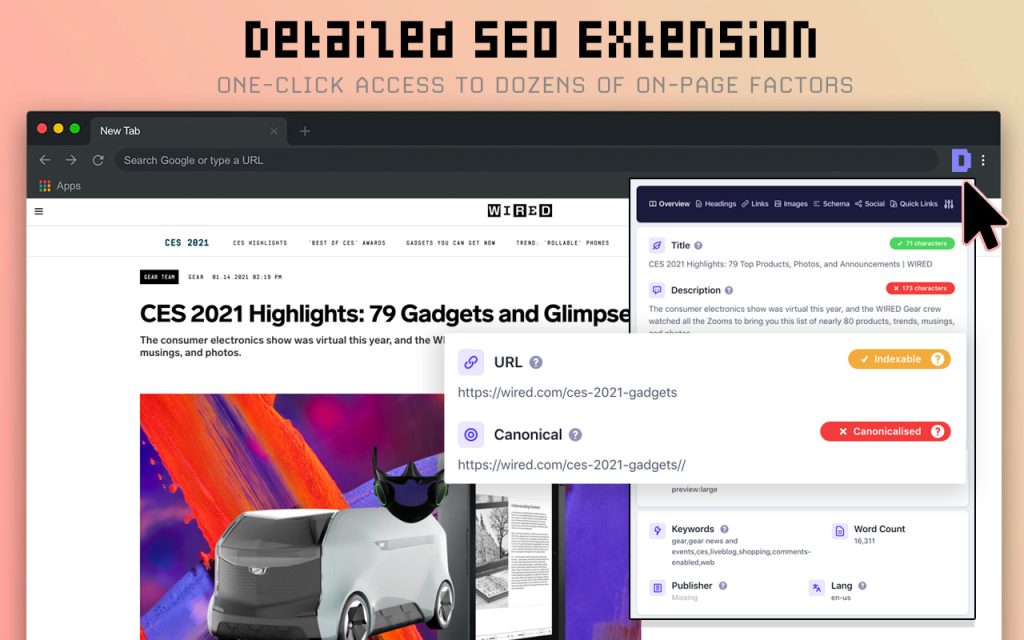
Free on-page SEO analysis in the browser
Strength: The Detailed SEO Extension gives you instant access to any page’s meta data, headings, schema markup, and internal links without leaving the browser tab. It is faster than any paid tool for quick on-page audits during competitor research or client reviews.
Pricing: Completely free, no paid tier, no upsells. Used by 450,000+ people weekly.
Pros & Cons: No account, no upgrade prompts, no tracking, genuinely free with no catch. The trade-off is scope: it is built for quick page-level checks, not site-wide crawls, so it complements a crawler like Screaming Frog rather than replacing one.
Website: Detailed SEO Extension
15. SEO Wallet
250+ SEO features in one free Chrome extension
Strength: SEO Wallet is a free Chrome extension that packs over 250 SEO tools into your browser without costing anything. It covers SERP analysis, structured data checking, redirect management, link checking, search intent finder, and on-page audits all in one place without switching between tabs or tools.
Pricing: Completely free, no paid tier exists.
Pros & Cons: It has a 4.9 star rating on the Chrome Web Store with 19,000+ users, and consolidates what would otherwise be five separate extensions into one. Because it packs in 250+ features, the interface takes a bit longer to learn than a single-purpose tool like Detailed SEO Extension.
Website: SEO Wallet
The best SEO stack in 2026 is not the most expensive one
It is the one that gives you the clearest data and the fastest feedback loop. These 15 free SEO tools do that without adding a single dollar to your monthly spend. Start with the tools that close your biggest gaps, build the habit of using them consistently, and you will get more from your current setup than most paid stacks deliver.
At Yaaply, we handle the one part of SEO that no free tool can do for you: building the editorial backlinks that give your content the authority to rank and get cited by AI. Every placement is editorial. Every link carries a lifetime guarantee.